 deepnet.at
 Reporter
Windows, installer without system entries
not legal advice: every assessment is a draft and must be reviewed by a lawyer.Prerelease. IUCOM Reporter is a pilot for validating AI in law and is in the test phase. The study examines how accurate the sources are, what quality the legal pre-analysis in expert-opinion style reaches and how effectively the pre-filters hide client data before sending. What is measured is whether an answer asserts something false: invented or misused sources, provisions in the wrong version, invented facts. Checks are made against the official sources themselves, blinded and in comparison with plain prompting. Study mode: any professional can retrace the study with their own cases. Use is free of charge for three months and can be extended on request during the test phase.
The sources of IUCOM Reporter
Before every assessment the reporter queries these open sources – each with its own AI queries and at the pace it permits. The AI cites only what is found here. Dashed: off by default, can be switched on.
Austria
Germany
Europe
Queries included · open, no account · each switchable in the program, quick choice Austria, Germany or AT + DE · The research in detail →
With IUCOM Reporter you create legal pre-analyses directly in Microsoft Word. You select a set of facts, press Ctrl+Alt+L and after a few minutes receive a draft in opinion style – with sources from the RIS (case law of the Supreme Court, the Supreme Administrative and Constitutional Courts, federal and provincial law), the legislative materials and EUR-Lex.
Cited, not invented. The AI cites only what the research actually found. Every source appears with file number, date and link as a real Word footnote following the AZR.Data protection on site: names, companies, addresses and identification numbers are replaced by placeholders on your computer, and before every transmission you see and confirm what is sent. No account, no central server: you use your own API key (e.g. Anthropic Claude); one analysis costs about € 0.50.
The Reporter delivers drafts for professional review, not legal advice. It is in a trial phase, which is why use is currently free of charge.
Try it free for 3 months now →

Behind the name IUCOMThe name links the foundations of European legal history with artificial intelligence. IU- stands for the Latin ius, law, -COM for commune, common and general. Together IUCOM refers to the ius commune, the “common law” of continental Europe: the learned law that spread from Bologna across Europe from the 12th century, rested on Roman and canon law and applied wherever provincial or city law was silent. In Austria the ABGB replaced it in 1811; its concepts shape the law to this day. The emblem: a silver coin like the bolognino, Bologna's coin from 1191, with a laurel wreath and the stamp IU. More in the FAQ.
Free to use –
minutes instead of hours.
An hour of a lawyer's time costs EUR 200 to 400. Gathering the relevant Supreme Court (OGH) case law in the RIS and the EU law in EUR-Lex alone often takes half an hour per case – IUCOM Reporter usually does it in under a minute in the background. The arithmetic in detail.
Built for lawyers' professional
secrecy (§ 9 RAO).
A native Windows application, developed in Austria – with no central cloud storing client data. Names, companies, addresses as well as contact and identification numbers are replaced locally by placeholders before the text goes to the AI; on request the software puts the real details back into the answer. What goes out is shown to you first, marked in red, for confirmation (review before sending). Your API key is stored on your computer, encrypted with Windows data protection.
Bring your own key –
future-proof instead of tied to a publisher.
You are not tied to any provider. When a new Claude model comes out, you select it with one click in the settings. You pay for usage at the provider's own prices, directly to the provider – with no mark-up. Updates of the 1.x version series are included.
It docks on everywhere.
Nothing to change, nothing to program: at a hotkey IUCOM Reporter reads the selected text from any Windows program – Word, practice management software, mail client and even PDF viewers – and puts the result in the same place. The installer has you up and running in about two minutes.
It leads from the selected facts through the research – analysis of the legal question, your own documents, case law, statutory texts, Findok and EUR-Lex – to the AI request and the finished assessment. It shows an unedited run with a tenancy case that names not a single provision. Via the relevant Supreme Court decisions the program found the governing provisions and supplied them verbatim: §§ 1096 and 1097 ABGB, §§ 3 and 33 MRG and § 9 KSchG.
Narrated by the synthetic voice “Cori” (generated locally with Piper, MIT licence; voice model trained on LibriVox recordings, public domain); the stations are captioned in English, the illustrations show the German program. 35 MB, loads only when played.
- Claude via Amazon Bedrock, ChatGPT via Azure OpenAI. For organisations with an AWS or Microsoft contract: Claude via Amazon Bedrock with the “EU only” tick (processing in EU data centres only, the place of processing is shown in the AI report) and ChatGPT via Azure OpenAI with your own resource. Enter region or address on the AI provider tab.
- Checked where everyone has the same foundation. Case law and legislation are the common foundation of every citation – there the Reporter is fully connected and checks against the official databases. It names the gap in the professional literature openly: literature references outside the sources appear as “not in the sources – to be checked”.
- PDF and browser too. Select text in a PDF (Acrobat, Foxit, Sumatra, PDF-XChange, Edge, Chrome) or on a web page – without a selection the whole text counts. The assessment goes into a new Word document (without Word into LibreOffice Writer). Proof-reading stays with writing programs.
- The icon bar in the document window. It moves into the window in front – Word, editor, PDF or browser – and shows all buttons there (no proof-reading in PDF and browser). Floating on the desktop it shows only the main button. If the window is closed, minimised or hidden, it waits on the desktop and returns by itself.
- Continuous progress bar – with Cancel. One window from reading to the finished answer: the reporter's emblem and name, the current step, provider, model and time – without gaps. Cancel stops the request at any time; the cancellation is logged with time and step and listed as “cancelled” in the archive.
- Check before sending: one table. Every item with placeholder, type and origin; uncertain items are at the top and marked yellow. With a right-click you decide whether an item is always or never anonymised in future. All these settings can be viewed and revoked in the options.
- More precise recognition. IBAN and card numbers only with a valid check digit (otherwise a yellow suspicion rather than a file number taken for an account); a form of address or role – “Mr”, “client”, “patient”, “born” – makes an uncertain name certain; law-firm and partnership names (“Gruber & Partner”) are replaced as companies.
- Narrated tutorial. The video explains every station with a synthetic voice – “Cori” on this English page, a narrator based on the “Kerstin” studio recordings (CC0, generated with Chatterbox, MIT) on the German one, “Cori” generated with Piper (MIT), both locally; the voice models are free of third-party rights (Kerstin: CC0, Cori: public domain).
- Checking rules against the sources – gold standard as an add-on. What is measured is whether an answer asserts something false: in use, fixed rules check every answer against the official sources. In the study mode answers of any origin – Reporter, plain prompting, other AI providers, humans – are compared blinded, with blind folder, Krippendorff's alpha and blinding check. Expert documents as a gold standard are now only an optional scientific add-on.
- Vetted AI providers only. You can choose Claude, ChatGPT and Mistral (EU), plus Claude via Amazon Bedrock (processing in EU data centres only, selectable) and ChatGPT via Azure OpenAI. Google Gemini, DeepSeek, OpenRouter and Groq are blocked – because of training on the data, processing outside the EU or uncontrollable routing.
What exactly does IUCOM Reporter do
IUCOM Reporter waits invisibly in the background; all you see is a small bar of icon buttons – at the window you are working in, without a document at the top right of the screen. You trigger it by shortcut or button – what happens then, in detail:
Your firm’s language as a rule set – the AI keeps to it.
It is not the provider that sets the tone, but what you laid down once.Keywords become prose
Individual dictated fragments become a coherent assessment: the area of law is recognised, the complete normal finding serves as the scaffold, and every fragment is placed where it belongs.
Complete, not patchy
Every element of the test is named individually – including the unproblematic ones, which may be summarised in a single sentence. Blanket phrases such as “no further concerns” are ruled out.
Dictation errors are repaired
Phonetically garbled terms are reconstructed from context; terminology, party names, dates and amounts are harmonised. The AI is instructed not to add facts, provisions or authorities; unclear passages are reported separately so that you can check them.
Word and sense check
Invented or misspelled words and correct terms in the wrong place (an 'appeal' where the procedure has a 'complaint') are detected: as its last rule the AI checks every word for plausibility; on request (Options) the program checks again – with Windows spell check, the sources and statutes of the request and a term list that grows by itself.
Interpretation by rank and method
Every assessment follows the rank of sources – constitution and EU law, statute, supreme courts, lower courts, administrative view (not binding), scholarship and materials as aids – and interprets by wording, context, genesis and purpose, including analogy (§§ 6 f ABGB). Where levels diverge, this is named.
Length to choose
Short, medium or detailed (Options): from half a page with result and decisive reasons to the full opinion discussing diverging views – short saves time and cost.
Facts and assessment kept apart
The facts stay brief and neutral: only what was dictated. The assessment does not retell them, it examines – in opinion style, without recommending a course of action.
Correct instead of rewrite
Ctrl+Alt+J corrects a finished assessment linguistically only: spelling, grammar, terminology – the medical content is left untouched.
Your model, your key
You can choose Claude, ChatGPT and Mistral (EU), and for organisations with an AWS or Microsoft contract also Claude via Amazon Bedrock (processing in EU data centres only, selectable) and ChatGPT via Azure OpenAI. Blocked are Google Gemini (free access allows training on the data), DeepSeek (processing in China), OpenRouter (the model routed to cannot be controlled) and Groq (no processing in the EU). You bring your own API key. For client data, paid access with a training exclusion, processing in the EU or local execution is recommended.
Word required – otherwise LibreOffice Writer
IUCOM Reporter requires Microsoft Word – standard in law firms. Without Word it needs LibreOffice Writer (free, The Document Foundation); if both are missing, an installation guide leads through the set-up in four steps and detects the finished installation by itself – without it the program ends. The Reporter downloads nothing itself. For comparison, Writer can also be chosen instead of Word in the options; the dashboard button then shows the Writer icon.
Rules per area of law
For every entry of your list – except “none” – you can store own rules AND own documents. Both are sent in addition to the general rule set as soon as the entry is selected; the pages for rules and documents follow that selection.
A guide, and a polish
A guide as a PDF explains what good rules look like: order, priority, scope, wording. Newly written rules are then ordered once by the AI itself – obligations to the top, one sentence per rule, duplicates merged; your own version is kept beside it.
Complete and accountable
The answer arrives piece by piece while it is being written. If it does not reach the end or the connection drops midway, IUCOM Reporter continues it by itself and joins the parts seamlessly. After every answer a window can show what the provider reported: model, stop reason in plain words, tokens used and cache hits.
Inserted safely
The answer is only inserted if your editor window is really back in front – otherwise it stays on the clipboard with a notice. Texts with client data are kept out of the Windows clipboard history (Win+V) and the cloud clipboard, your previous content is restored afterwards. Word's pagination setting is left untouched.
In a person’s style – on request
From a person’s works the AI creates a style profile in its own words once – tone, sentence structure, choice of words, structure, argument, citation style. After that only the profile goes with each request, never the works; content, sources and checking rules take precedence. Off by default; only your own works or works whose authors have consented (style profiles).
Rights cleared before every import
Before documents, gold standard or works for a style profile are read in, the program checks every file locally for its licence and shows a traffic light; you confirm that all rights have been cleared beforehand. Whatever needs permission does not go to the AI without your declaration (details).
Five steps, all in the writing program you already use.
On the left the one-off setup in six steps. Next to it the daily work and the study mode. Every picture is a screenshot from the running program.
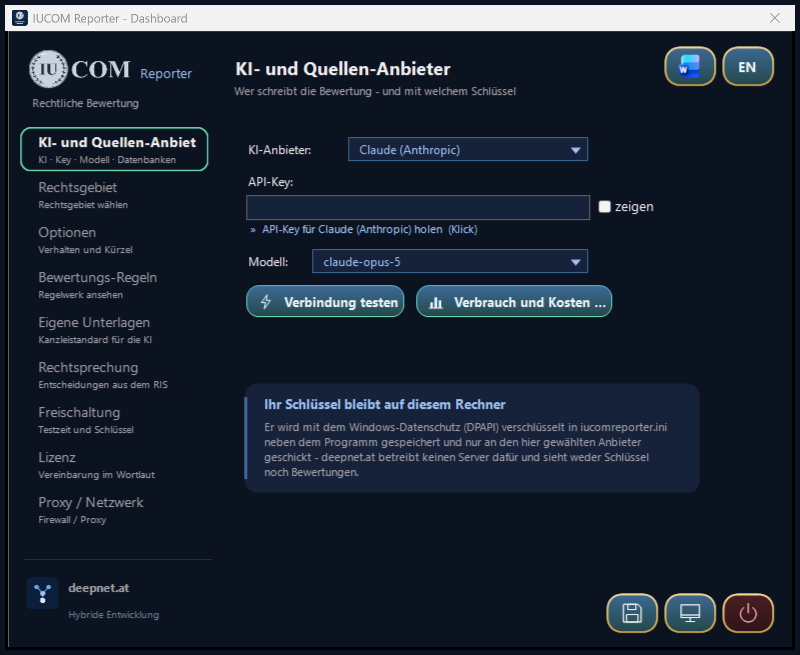
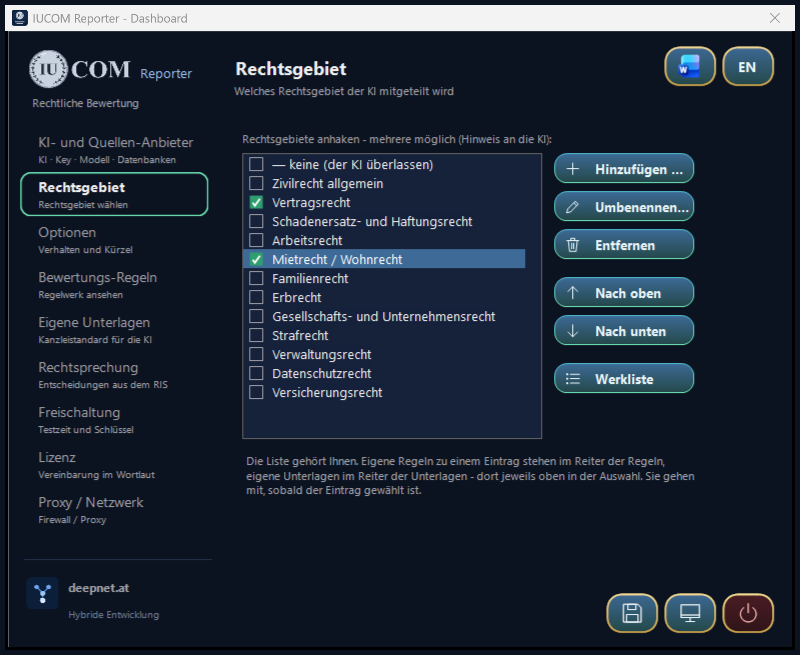


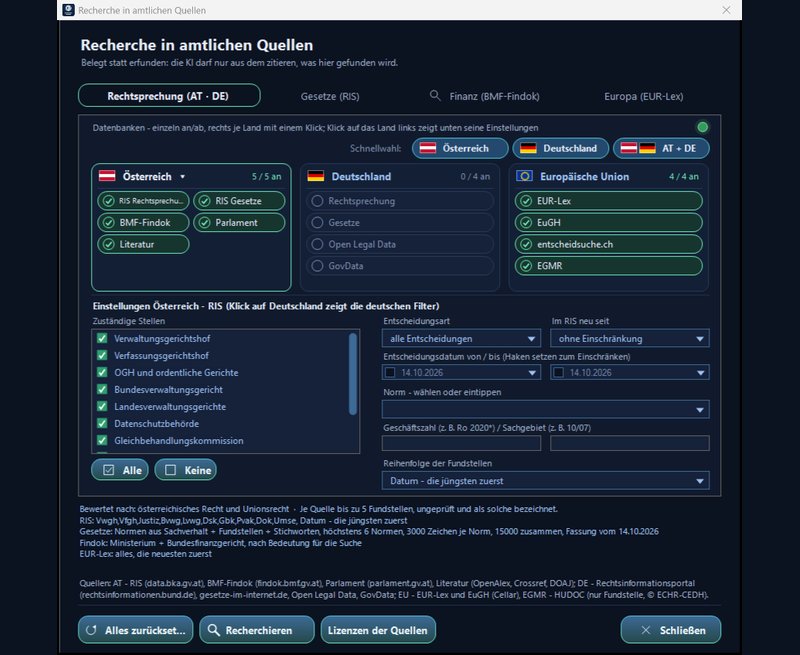


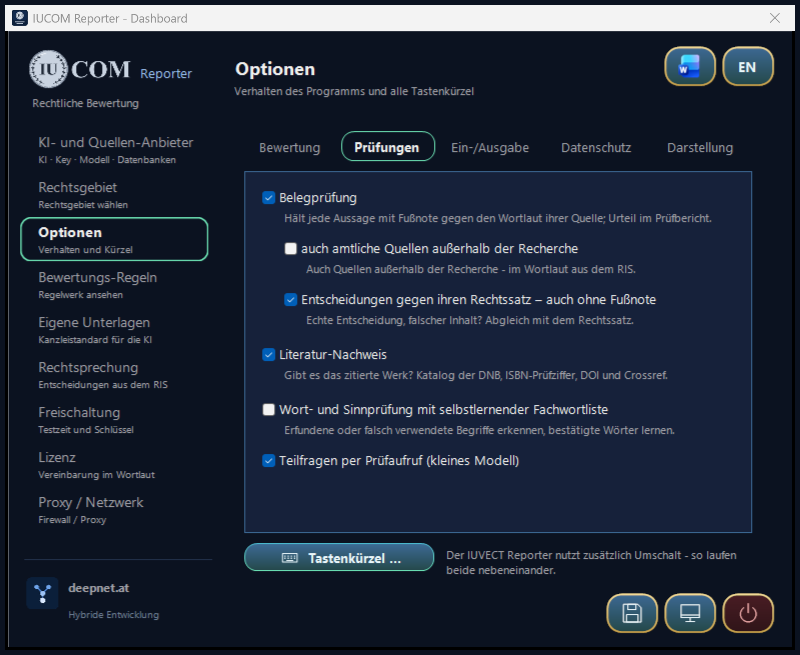

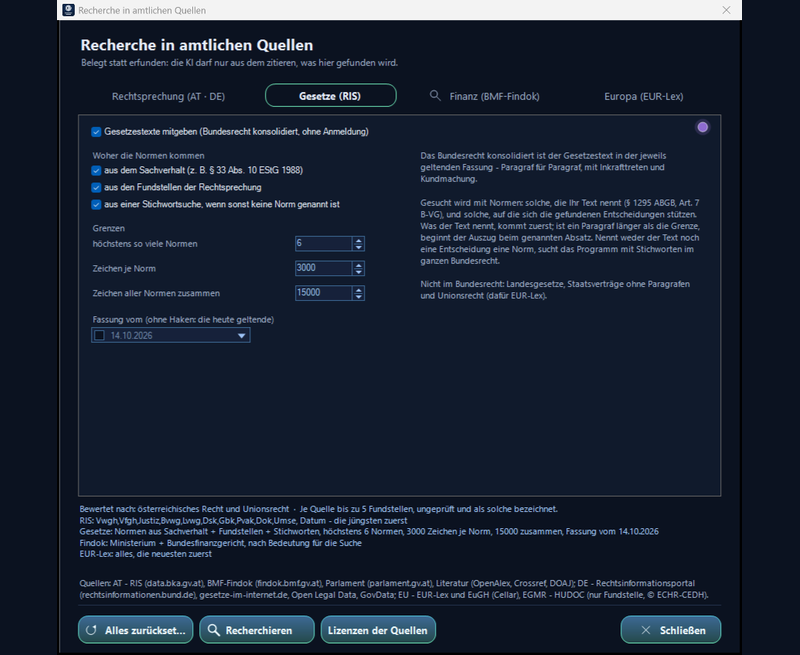
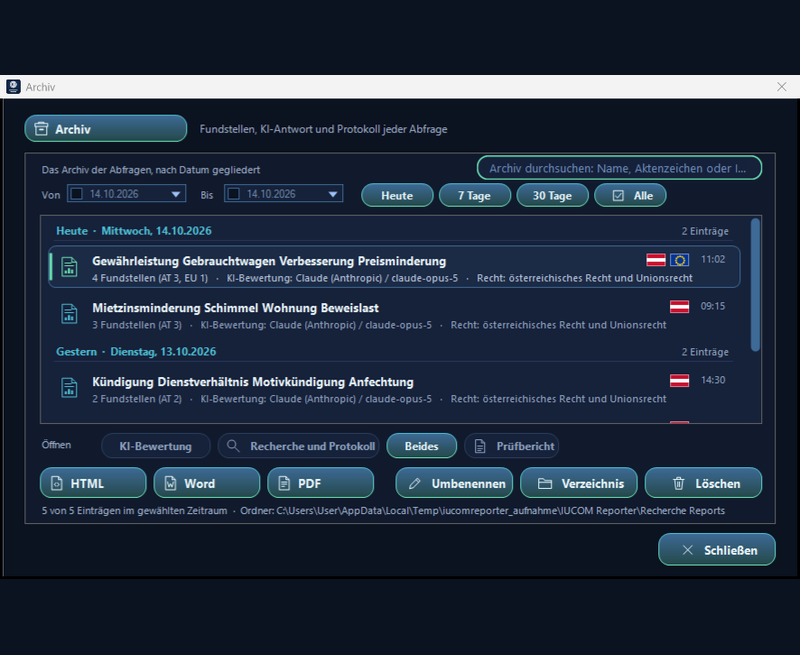

IUCOM Reporter is operated from the icon buttons, the icon in the notification area and global keyboard shortcuts.
How to get there
Keyboard shortcuts
| Button | Keys | Function |
|---|---|---|
 | Ctrl + Alt + L | Assessment synthesis – the selected dictation becomes an assessment |
 | Ctrl + Alt + J | Assessment correction – the selected assessment is only corrected |
| – | Ctrl + Alt + U | Restore – the text last sent comes back |
 | Ctrl + Alt + R | Learn from the correction – from the draft and your revised version the AI proposes rules – an assistant guides you in four steps: compare, choose rules, scope, adopt |
 | Ctrl + Alt + D | Text editor – Word or LibreOffice Writer |
 | Click the button | Dashboard – settings, area of law, archive, study mode; at the bottom right Save, To the desktop and Quit |
The same three actions also sit as icon buttons at the window you are working in (without a document at the top right of the screen). They are there while IUCOM Reporter is ready; they disappear while it is working and while the settings window is open. Clicking one does not take the selection away from your editor. The bar shows only what is available right now: without an open editor window just the program icon; every answer is in the archive.
IUCOM Reporter does not work from a free-form prompt but from a fixed, readable rule set in opinion style. The ground rules apply to every assessment and can be extended or overridden per area of law.
Why a rule set
The quality of an answer depends less on the single instruction than on the whole request: which rules apply, which sources and own documents are attached, in which order and form the facts are presented. IUCOM Reporter assembles this request for you. How much that adds compared with plain prompting is measured by the ongoing study.The order of the legal examination
Legal basis or legal question, elements, legal consequence, defences and procedure – every point by name, in opinion style: issue, standard, subsumption, result. The “Assessment rules” tab shows the wording as a preview, a structured PDF or a text file; it can be changed under “Modify”.
What the rules require
Completeness of all elements; time limits and burden of proof where they matter; no invented provisions, time limits or amounts; open points named expressly. Materials are cited only from the attached sources. The assessment deliberately gives no recommendations for action: they remain the lawyer's business.
The rule set determines how an assessment is built. Your own documents determine how it sounds at your firm: structure, phrasing, checklists. Both go to the AI together. On request it also writes in a particular person’s style – following a style profile.
Drop them in, that is all
On the “Own documents” tab a button opens the folder. Put Word, PDF, RTF and text files there: the firm standard per area of law, checklists, model assessments, your list of preferred phrasings. Word and PDF files are converted to text once and stored locally.
Two ways – the program picks
If the collection is small (up to about 12,000 characters) it goes along in full with every assessment; the provider holds it briefly to save cost and time. If it is larger, IUCOM Reporter looks up the fitting excerpts for each dictation – by wording and by meaning, entirely on your computer. Only the selection goes to the AI.
Before reading in: licence check and confirmation of rights
Before every import – documents, gold standard or works for a style profile – a window lists the files with a traffic light for each: permitted, with conditions, own document only or permission required. The licence check runs locally and is one reading, not legal advice. It recognises CC licences, “all rights reserved”, reservations against AI use and text and data mining, official works (free under § 7 Austrian Copyright Act), publishers’ works (imprint with ©, ISBN or reservation of rights), journal articles (headers such as “SWK 2024”), licensed professional databases (“Lizenziert für …”) and file properties – the Word author as a sign of own work, a rights notice in the PDF. Nothing is read in without the required tick “all rights cleared beforehand, I am liable myself”; documents marked red do not go to the AI without the additional tick “licence/permission exists”. Every confirmation is logged locally.
In a person’s style: style profiles
Options → Input/output: the tick “Write the answer in the style of a style profile” (off by default) and the button Style profiles …. In the window one profile per person – a folder in the program folder: Create, Open folder, Create style profile, Use for answers, Switch off. When the profile is created, pseudonymised excerpts – at most 40,000 characters, without file names – go once to the AI provider you set, together with locally measured indicators, after the rights confirmation and the check before sending. What comes back is a style profile in the AI’s own words: tone, sentence structure, choice of words, structure, argument, citation style – no phrases from the samples verbatim. After that only the profile goes with each request, never the works, never the profile name; content, sources and checking rules take precedence. Only your own works or works whose authors have consented.
How this works in detail – caching, excerpt retrieval, cost per assessment and the selection of sources – is set out in the technical dossier.
Before every assessment IUCOM Reporter queries open official sources by itself and attaches what it finds to the request. The AI preparation makes queries of its own for every source in the language of the case law, narrowest first, and names the relevant provisions. All sources are open and need no account; only the search query goes out – with placeholders instead of names. The AI therefore cites not from memory but from the attached sources.
The sources in detail
IUCOM Reporter does not query literature. Own documents such as checklists and model assessments can be included via the “Own documents” tab.
A language model answers every question, even when it does not know the answer. In legal matters that shows up plainly: file numbers that never existed, judgments nobody handed down. IUCOM Reporter therefore takes a step in front of it – an upstream stage that sits between your dictation and the AI and makes sure the evidence is on the table before the first sentence is written.
What an upstream stage is
Upstream means: it runs before the request, not after it. It does not check afterwards whether the AI cited correctly – it puts only what is officially documented in front of it from the start, and forbids everything else. The difference is practical: a check afterwards finds mistakes, an upstream stage keeps them from arising. The price is a few seconds before each assessment.
The process, step by step
- AI preparation. Your text – or what you type into Research – goes, with placeholders instead of names, to the AI you set, in a short preliminary step. It returns the area of law, the competent courts (for medical liability, say, only the Supreme Court and ordinary courts), three to five queries in the words that actually occur in decisions (narrowest first, then broader) and the relevant provisions – Austrian ones, and German ones too if German sources are on. For Findok and EUR-Lex it names queries only if tax or Union law is involved; otherwise those sources are not asked at all. Without a key or an answer, the program itself extracts up to three telling terms from the text. The AI picks courts and filters per query – for Germany too (federal courts, jurisdiction) and for EUR-Lex (judgments or legal acts); your settings stay untouched. A short keyword in Research is prepared the same way; your own words are searched first. The areas of law you have set – one or several – reach the AI only as a hint: the facts decide, you need not change anything before a search. If nothing comes back – no preparation or no source – the program checks why by itself: the AI's answer (key, overload, “no legal issue”), connection errors per source, a test query to the RIS, active filters and the search term (umlauts, too many words). The result appears as a message in front, with what helps, and is written to the log. Only what is relevant: before the assessment the AI checks every source against the facts and discards decisions from other areas of law – with their provisions; chapter 1 of the report names what was discarded. Provincial law: if the AI recognises a province (building, zoning, land transfer …), the provincial statutes are added verbatim. Citation check: after the answer the program matches every file number, RS number and section against the sources and your text; an unsupported decision is reported at once. Selected an earlier assessment? The program asks: revise or assess anew.
- Queries per source. The queries go to the case law in the RIS, the BMF Findok and EUR-Lex – each with its own parameters, measured beforehand against that very interface. The fourth source, the statute, is queried by norm (see below). In the RIS all selected courts (OGH, VfGH, VwGH, BVwG …) are asked side by side instead of stopping at the first one with enough hits; if the RIS cannot be reached, the search stops quickly instead of waiting for minutes. If German sources are switched on, the AI's German queries go there (sources by country).
- Query by query. Each source asks the AI's queries in turn, each in full, until enough has come together. There is no more word-by-word shortening: the databases join all words with AND, and shortened facts hit everyday words. Measured on a medical liability case – contrast examination without written consent, death on the way home: the old staged search ended at “wurde in einem Krankenhaus” and returned asylum decisions of the Federal Administrative Court together with the Asylum Act; the preparation returns the Supreme Court's propositions on the doctor's duty to inform and §§ 1299, 1295, 1327 ABGB, § 5a KAKuG and § 51 ÄrzteG.
- Selecting. Each source returns a stock – three times what goes out. From it the program picks: how well a source fits the text is weighed, and a match in the statutes or the file number counts double – in law the provision is the most precise signal. Whatever overlaps too strongly with an already chosen decision drops out: five sources on the same legal proposition would be four too many. Only for the most promising is the wording then fetched – side by side rather than one after another, which saves the most time.
- The statutes. Last, the statutory text is added – consolidated federal law, in the version in force on the date set. Taken are first the norms the AI preparation names, then those your text names (dictated too, and including enumerations and ranges such as “§ 1295 Abs 1 und 2 ABGB” or “§§ 1293 bis 1295 ABGB”, whose intermediate sections are filled in) and those the decisions found rely on – from all areas of law, not only the one selected. If a section is longer than the limit, the excerpt starts at the paragraph named. If nobody names a norm, the program searches all federal law by keyword.
- The block. Everything travels as a clearly marked block of text before your own – with court, file number, date, norms, link and the explicit rule: cite ONLY from this; anything not in it counts as unproven.
- The assessment. Only now does the request go out: rule set, own documents, sources, your text – in that order.
- The record. Every search is filed in the archive (how the report is built) – with the AI's answer and the log of the AI request. And below the finished assessment – if “Show the upstream stage below the answer” is ticked in the options – stands what it rests on: the sources with court, file number, date and link, the own documents used and the code of rules it was written by. So it is always clear on what basis the AI wrote.
Why this makes the difference
What leaves the computer – and what does not
Only the search terms go to the authorities. They never see your dictation, file numbers or documents; the facts are seen beforehand only by the AI provider you chose – for the preparation, with placeholders instead of names and after the same check before sending. Names are sorted out of the search terms – words after Mr, Ms or titles, next to party roles such as plaintiff, defendant or client, before GmbH, AG or KG, and words written in capitals; only legal terms and known statute and court abbreviations go out. The queries run without an account. What comes back are published, official texts. Only afterwards does the actual request go to the AI provider you chose – with placeholders instead of client data, which you review first (see below).
Review before sending
If the selected text contains personal data, IUCOM Reporter replaces it before anything leaves the computer – and shows you the result before it goes out.
- Detect. Before sending, IUCOM Reporter looks for personal data in the selected text: real names and academic titles, addresses with postcode and town, e-mail addresses, phone and mobile numbers, IBAN, account number, bank code and BIC, credit cards, social security numbers, ID card, passport and driving licence numbers, tax numbers, vehicle registration plates, IP addresses, dates of birth, company register and VAT numbers. Each is replaced by a synthetic placeholder such as [PERSON_1] or [TITEL_1]. In addition a local name model recognises people and companies from context – even a first name on its own or a foreign name. It runs on your computer only, offline. If it is missing, a check against the Windows dictionary flags unknown proper names as suspected. Medical and technical eponyms (such as “Crohn’s disease”, “Bosniak”) and courts are left as they are.
- Review. If anything was replaced or is suspected, the revised version opens in a separate Word instance – every replacement marked in red. Beside it a small window shows the mapping. You can still correct the text in Word; without Word, IUCOM Reporter shows it in a window of its own. Beside it is one table (since 3 October 2026): every item with the placeholder it is sent as, its type and what found it. Uncertain items are at the top in yellow; a tick replaces them, removing it puts the original back, a grey tick marks a fixed rule. Whatever you send yellow and unticked counts as harmless from then on and is no longer marked. Right-click remembers “always” or “never” (all such settings can be viewed and revoked in the options); under “Missed something?” you add a name. IBAN and card numbers count only with a valid check digit, a form of address or role (“Mr”, “client”, “patient”) makes an uncertain name certain, and law-firm and partnership names are replaced as companies.
- Send – or cancel. Only Send passes exactly this version to the AI; the legal databases receive search terms without personal data only. Cancel means nothing is sent.
- Restore the real data – if you wish. Once the AI answer has arrived, IUCOM Reporter shows it in a separate Word instance with the real data put back, each item marked in green; you choose Insert real data or Keep placeholders. The mapping never leaves the computer.What the answer for restoring looks likeClient Mag. Max Mustermann concluded a tenancy agreement with Muster Immobilien GmbH which … The legend of the replacement table (placeholder → plain text) is saved locally with every archive entry in the protected storage folder – as chapter 7 “Replacement table – placeholders and plain text” in the report; the folder is readable only by your own Windows account.
The assessment is a draft; you revise it. That is exactly where the knowledge sits that the program lacks. With Ctrl+Alt+R the AI compares its draft with your final version and proposes up to two rules, so that next time it comes out that way at once. This comparison, too, runs pseudonymised and with the review before sending. Nothing is written until you adopt it.
What to do
- Have it assessed. First an ordinary assessment with Ctrl+Alt+L. It stays saved – together with the area of law – as the reference point, after a restart too; “Other answer …” picks an earlier one.
- Revise it. Change the draft the way it should go out – in Word, in LibreOffice Writer or in any window. Only what you actually change can be learned from.
- Select and press Ctrl+Alt+R. Select the revised version and press Ctrl+Alt+R – or the learn button on the bar or “Learn …” on the rules page. Without a selection the whole document counts. If nothing has changed, the program says so and stops.
- Compare and choose rules. The learning assistant shows the draft and your version side by side, every change below, and proposes up to two rules – with ticks, freely editable, also one of your own. You also choose whether they apply generally or only to the area of law of the last assessment.
- Adopt – or discard. The assistant shows what goes into the rule set and warns if a rule is already there. Only Adopt writes – from the next request on the rule takes effect; Discard leaves everything as it was.
What the program does NOT do
Why this is worth it
A code of rules otherwise grows only when someone sits down and writes rules – and in daily practice that rarely happens. Here it grows where the work happens anyway: at the point where you are revising a draft in any case. After a few weeks the rules hold what makes your hand recognisable – in sentences you approved yourself.
In practical use every answer passes fixed checking rules against the official sources. In the study mode – itself a project in trial – measurement is blinded and in comparison with plain prompting – also for answers by other AI providers or by humans, as they arise in practice. Expert documents as a gold standard are an optional scientific add-on; they do not serve as the yardstick for practical use. The procedure is in the study dossier; the check of every answer in use in process dossier.
Checked against the sources themselves
The yardstick is the official sources: cited decisions are looked up in RIS (including VfGH and regional administrative courts), NeuRIS and at the CJEU, provisions without a source checked against federal law in force for section and paragraph, every footnoted statement held against the wording of its source, differing dates and unsupported sources flagged, cited works of literature verified in the catalogue.
Any technology as it is actually used
Reporter runs, a control without pre-processing and imported finished answers by experts, students or other AI providers – from Word, PDF, CSV, Excel or JSON exports. Outcome-based rather than system-based: what is tested is what comes out.
Blinded and randomised
Uniform format without telltale outward features, equal pseudonymisation, random order, codes. The origin is switched on only after grading; whether the blinding held is measured.
Two stages, with hallucination rates
Hallucination rates for sources and facts per answer and the categories correct, incomplete, hallucinated as in the Stanford study; for the Reporter retrieval and rendering separately. Alongside the opinion catalogue by analogy with the ABGB and the university grid.
Human reviewers
A blind folder with rating sheet goes to professionals; Import ratings computes Krippendorff's alpha (Cohen's kappa for two reviewers), checks the blinding and shows the results per condition.
Reproducible and privacy-compliant
Per answer model, version, date, question and checksum, plus random seed and wording of the requests. Answers by humans only with consent, under an ID and pseudonymised; a GDPR template is included.
The program shows these same three diagrams under Process on the rules tab – switched with the buttons Rule-making, Request and Learning; there they can also be saved as an image.
Rule-making
write – have it checked – settle how it applies- 1
What forGenerally – or choose a single area of law.
- 2
WriteModify opens Word (otherwise LibreOffice Writer). Rules of other categories can be inherited with a double-click.
- 3
KeepYour version stays as regeln_roh.txt – it is never lost.
- 4
The AI checksContradictions among themselves AND against the general rule set, plausibility, order – the AI resolves them without inventing anything.
- 5
Settle the orderThe AI settles the order in which the parts go out: G general rule set, K rules of the category, U own documents, T your text – T always last. Measures, in this order of priority: 1. the best answer, 2. speed, 3. cost.Own documents in the fixed system block: it stays the same and is cached at the provider – faster and cheaper.Own documents immediately before the text: closer to the case, but sent anew every time.
- 6
Anything changed?The AI says whether it touched anything.yes: dossier and protocol are created.no: an old dossier is deleted, your version applies.
- 7
Dossier and protocolEvery change with its reason – and the settled order. Both stay with the category and can be viewed in Word at any time.
- 8
ScopeThe green button on the rules tab decides.extends the general rule set.replaces it – only these rules apply.
- 9
In useFor every request the parts go out in the order of the protocol: general rule set, rules of the area of law, own documents – your text last.
Request
select – check placeholders – real data back- 1
SelectSelect the text – in Word, LibreOffice Writer, a PDF or the browser. The icon bar sits in the document window in front; floating on the desktop it shows only the main button (since 3 October 2026).selected: exactly this passage goes out.nothing selected: the whole document goes out.
- 2
TriggerCtrl+Alt+L for the assessment, Ctrl+Alt+J to only correct – or the button on the icon bar.document, PDF or browser window in front: the buttons appear in it (no correction in PDF and browser).none open: both buttons stay locked.
- 3
Replace personal dataNames, titles, addresses, phone, account, ID and tax numbers are replaced by synthetic placeholders – [PERSON_1], [TITEL_1], [ADRESSE_1], [IBAN_1] … The mapping stays on this computer only. A local name model also recognises people and companies from context (without it: dictionary suspicion).something replaced or suspected: on to the check before sending.nothing replaced or switched off in the options: on without the check.
- 4
Check before sendingA separate Word instance shows the version that will be sent – the placeholders in RED; beside it a window with the mapping. One table: every item with placeholder, type and origin; tick = replaced, uncertain items YELLOW at the top – sent unticked, they count as harmless from then on; right-click: always/never.Send: the version from Word goes out – including what you corrected there.Cancel: nothing is sent.
- 5
Ask the official sources – AT · DE · EUThe AI turns the text – already with placeholders – into queries in the language of the courts and names the relevant provisions; Findok and EUR-Lex only if tax or Union law is involved. Austria: RIS, federal law, BMF Findok; EU: EUR-Lex and the CJEU, the ECtHR via HUDOC; optionally Germany: federal courts, Open Legal Data and the statutes of gesetze-im-internet.de. A match in the statutes weighs heavily, near-duplicates drop out; every entry found carries its country. The AI checks every source for relevance and discards other areas of law; Supreme Court legal principles carry their RS number; if the AI recognises a province, provincial law is added. A brief network drop-out is retried once.found: the sources go along – cited, not invented.nothing found: the internal check names the reason. The assessment is built without sources and is clearly marked “without supported sources” at the top.
- 6
Build the requestThe parts go out in the order of the protocol – your text last. Plus the rule on interpretation and rank of sources and the chosen length (short, medium, detailed). Large collections contribute only the fitting excerpts: each excerpt carries its heading, consecutive excerpts overlap, and what belongs to the chosen area of law comes first. The search runs on wording and on meaning – meaning is computed by a small language model on your machine; nothing goes online.one area of law replaces: only its own rules.one or several extend: general rules + the rules and documents of all chosen.
- 7
To the providerStraight to the chosen provider over HTTPS, with your key – it is stored encrypted with Windows data protection (DPAPI). A continuous progress bar with the reporter's emblem shows every step up to the finished answer – provider, model, time; Cancel stops the request at any time, the cancellation is logged and listed as “cancelled” in the archive. As its last rule the AI checks every word for plausibility – in the text it was given as well; ambiguous passages are rendered neutrally and reported as “unclear in the text”. On request (Options, off by default) the word and sense check follows – still with placeholders: fixed spellings, invented words and wrongly used terms. What Windows spell check, the texts sent along and the learned term list do not know, the AI checks in a short extra call; confirmed words are learned, wrong ones replaced at once next time.cut off or connection lost: the program continues by itself.complete: word and sense check if switched on, then output.
- 8
Bring the real data backIf anything was replaced, a separate Word instance shows the answer with the real data re-inserted in GREEN. The mapping never came from the AI – it stayed on this computer.Insert real data: the answer is back in plain text.Keep placeholders: the answer goes on with the placeholders.
- 9
FileThe answer is saved at once. The archive entry – sources in the colour of their origin and with their flag, the answer, the log of the AI request and the replacement table placeholder → plain text – lies as one file in the filing folder, readable only by your Windows account; Word, PDF and HTML are created from it at a click, the table of contents with provision or court and statute in short form. Search by name, reference or content; the right mouse button assigns a reference and sets up a watcher: on request it asks with the same search terms for decisions published since the query.
- 10
Where to?A read-only document, a PDF or browser window, or the box on the Options tab decides.a separate Word document – your text is untouched.in place of the selection.
- 11
InsertThe target window is brought back to the front; in Word the answer takes exactly the place of the selected passage. An open editor window receives it as well. If the target window is not really in front, the answer stays on the clipboard with a notice.
- 12
ReportThe box on the Options tab decides. The report always appears in front – even when Word is on top. It contains the citation check: every decision and provision in the answer is matched against the sources, anything unsupported is reported.on: model, stop reason, tokens, cache.off: just a short notice.
- 13
Review and take responsibilityCtrl+Alt+U brings the original back – the answer was a draft.
Learning from a correction
revise – Ctrl+Alt+R – review the proposal- 1
ReviseYou revise the AI's answer the way it should go out – in Word, in the editor or in any window.
- 2
Start learningCtrl+Alt+R, the learn button on the bar or ‘Learn …’ on the rules page – all open the same assistant.from the document: the selection or the whole document becomes your version.from the dashboard: you paste your version in the assistant.
- 3
CompareThe AI's draft and your version side by side, every change below (‘old → new’). The draft comes from the last answer – after a restart too; ‘Other answer …’ picks an earlier one.
- 4
Propose rulesThe AI compares both – pseudonymised, with the check before sending.only style or spelling: no rule – an own one is still possible.a difference in substance: up to two proposed rules.
- 5
Choose rulesEvery proposal with a tick box and editable, plus a field for an own rule – up to here the rules are untouched.
- 6
ScopeYou decide the scope.for all assessments.only for the area of law of the last assessment.
- 7
AdoptThe assistant shows what goes into the rule set and warns if a rule is already there. Only ‘Adopt’ writes – the rule applies from the next request.
Import
document – licence check – confirmation of rights – read in- 1
Choose documentsDocuments, gold standard or works for a style profile – every import starts with the same window.
- 2
Licence checkEvery file is read on your computer – one reading, not legal advice.
- 3
Traffic light per filepermitted · with conditions · own document only · permission required.
- 4
Confirmation of rightsRequired tick: “all rights cleared beforehand, I am liable myself”.confirmed: on – the confirmation is logged locally.cancelled: nothing is read in.
- 5
Marked red?Documents with “permission required”.with the additional tick “licence/permission exists”: may be used in AI requests.without the additional tick: do not go to the AI.
- 6
Read inOnly now are the files read in – with the confirmed rating of each.
Style profile
works – the profile once – only the profile per request- 1
File the worksOne profile per person – a folder in the program folder (Style profiles … → Create, Open folder).
- 2
Selection and indicatorsLocally: excerpts, at most 40,000 characters, without file names – plus locally measured indicators.
- 3
Confirmation of rightsThe same window as before every import: traffic light per file, required tick.
- 4
PseudonymiseThe excerpts go out only with placeholders instead of names and identification numbers.
- 5
Check before sendingYou see what goes out.Send: once to the AI provider you set.Cancel: nothing is sent.
- 6
Style profileA profile in the AI’s own words: tone, sentence structure, choice of words, structure, argument, citation style.
- 7
Only the profile per requestUse for answers and the tick under Options → Input/output (off by default): only the profile goes with each request – never the works, never the profile name.
Study mode
The test phase – measured blind whether an answer asserts something false- 1
Gold standard (optional)Optional scientific add-on: expert documents per area of law as reference for completeness and quality.Who: Experts
- 2
CaseAn entry from the archive – the question for all answers.Who: Study lead
- 3
ConditionsReporter with pre-processing, control without pre-processing, imported finished answers.Who: Reporter & import
- 4
BlindingNormalise, pseudonymise, random order, codes X, Y, Z …Who: Program
- 5
ComparisonPre-sorted blind: hallucination rates for sources and facts, category – with a gold standard also the agreement.Who: AI reviewer
- 6
ReviewersBlind folder for humans – rating sheet, guess the origin, agreement.Who: Humans
- 7
ReportUnblinded: every code in the colour of its originXYZWQ – every condition with model, version, date and checksum.Who: Study lead
What is measured is whether something false is asserted
The yardstick is the official sources themselves: whether a cited decision exists, date and file number are right, the source comes from the research and the facts are in the case. Expert documents as a gold standard are an optional scientific add-on (STARD). More in the test bench, the process dossier and the study dossier.
The steps outlined in amber are decisions; below them you see what happens in either case. The bold silver box is the result.
What defines IUCOM Reporter is not law alone but the interplay of three things: what you put in, the evidence the program finds for it, and the rules by which it becomes a text. This pattern can be carried over to other fields.
From a keyword to a text
You enter whatever you have: single words, phrases and sentences up to entire complex texts. No fixed form and no mask are needed – the tool arranges the material instead of demanding it.
Evidence instead of memory
Before every answer the program searches official sources – case law, statutes, Union law – and puts the findings before the AI. Only these may be cited; whatever is not supported is reported.
A rule set instead of a free prompt
Fixed, readable rules determine what is examined, how it is weighed and in which order it is written. Only material, evidence and rule set together steer the AI in the desired direction.
Many fields, one pattern
IUCOM Reporter is cut to legal case work; the principle behind it is not. Sources and rule set are exchanged, not the technology: opinions, assessments, minutes, technical reports, audit reports, legal and commercial texts follow the same pattern.
More than a chat
Common AI chats can store instructions and documents permanently. What they do not do: research official sources before every answer, check every citation against the sources afterwards, replace client data before sending, keep Austrian and German law cleanly apart and put the result with real footnotes straight into your document.
Meaning is recognised by experts
Whether a generated text is right on the merits is always for the experts to judge. The AI formulates and arranges; whether the result holds is for you to decide.
IUCOM Reporter is not offered as an open download; it is released personally – the same path as the pilot project's demo. Confirm your e-mail address and the download is available right away.
- Send the form
You receive an e-mail with a confirmation link, valid for 48 hours. Without confirmation your entry is deleted automatically after a few days. - Confirm your address
The link leads straight to the download of the installer Setup_IUCOM_Reporter.exe; the same message carries the SHA-256 checksum for comparison. The download link is personal, valid for 14 days and can be withdrawn at any time. - Activate
I create the activation key for your particular computer individually and send it by e-mail – procedure under Activation.
One installer that brings everything along – install, start, activate, enter your key.
-
Run the installer
Run Setup_IUCOM_Reporter.exe. It brings everything along – the program, the language model for the meaning-based search and the required runtime files –, checks the requirements (Windows 64-bit with .NET Framework 4.7.2, present on Windows 10 and 11; Microsoft Word is required as well, without Word LibreOffice Writer), shows the licence for confirmation and puts everything into one folder,
C:\IUCOM Reporterby default. No registry or environment entries. If Windows SmartScreen reports an unknown file: the files are not signed – only run what you received through your personal link.Details
- On request it creates shortcuts in the Start menu and on the desktop.
-
Start the program
Via the shortcut or Iucomreporter.exe in the installation folder: IUCOM Reporter places itself invisibly in the background, puts its icon in the notification area and shows the icon buttons at the window you are working in, without a document at the top right.
Details
- Starting it twice does not create a second instance – it simply brings up the settings of the running program.
- Activate On first start the Activation window opens. The procedure is described in the next section; without activation the program writes no assessments.
-
Enter your API key
In the AI provider tab choose a provider and paste your own API key; “Test connection” checks it right away. The key is stored encrypted with Windows data protection (DPAPI) in
iucomreporter.ininext to the EXE (or under%APPDATA%\Iucomreporterif that folder is read-only).Details
- Behind a firewall: tab Proxy / network.
-
Optional: start automatically
In the Options tab the checkbox “Start automatically at logon” switches autostart on and off: when set, saving writes an entry under
HKCU\; clearing it removes the entry again. No Windows service is installed. To uninstall, run Entfernen.bat in the installation folder (clear the checkbox first): it removes the program and the shortcuts, your documents and the activation stay.Software\ Microsoft\ Windows\ CurrentVersion\ Run Details
- What remains:
iucomreporter.ini, the foldersUnterlagenandFreischaltungin the installation folder and, if used,%APPDATA%\Iucomreporterwith the activation mark and the log – delete them by hand if you wish.
- What remains:
IUCOM Reporter is activated per machine. This keeps track of where the program runs, and modified copies cannot activate themselves.
-
Read the request code
The Activation window (automatic on first start, later via the tray menu) shows this machine's code at the top, e.g.
RR-AKTIV-XXXXXXXXXXXXXXXX-0. It is derived from a one-way function over the Windows device ID – it cannot be traced back to the machine or to you. - Send the code Send request sends the request with your e-mail address straight to the licence server. If that is not possible, Prepare e-mail sets up a ready-made message to the licensor, or you copy the code. What is transmitted is listed below.
-
Enter the key
You receive an activation key of the form
PCK2-YYYYMMDD-…. Pasting the entire reply e-mail into the field is enough – the key is extracted, even if the mail program wrapped it over several lines. “Activate” checks it immediately.Details
- The key is an RSA signature over exactly this request code. It is valid once and only on this machine; on another machine it is rejected.
- The program verifies with the public key only – it cannot create an activation itself.
- The expiry date is taken from the signed key only.
-
After the trial period
The first activation is valid for three months; during the prerelease phase it is extended free of charge on request. Seven days before expiry the program reminds you at start-up. In the Activation window, Send request sends your request code; the new key comes back. No reinstallation, settings are kept.
Details
- The mark is stored in
%APPDATA%\and is bound to the machine: copying it elsewhere has no effect.Iucomreporter\ iucomreporter_aktiv.dat
- The mark is stored in
IUCOM Reporter is activated per computer. During the prerelease phase use is free of charge; the trial is extended on request. The plans for the period afterwards will be announced when the study ends – nothing becomes chargeable without your express consent.
Right of use
An activation covers one computer; further computers are activated individually. What you use IUCOM Reporter for is entirely at your own discretion. Reselling, distributing modified versions and removing the activation are not permitted. Passing the unmodified file to colleagues is welcome – their computers are then activated separately.
Responsibility
The software is provided “as is”. I accept no responsibility for how it is used and no liability for any resulting damage, as far as legally permissible; intent and gross negligence are exempt. Every generated text is a draft that you review and take responsibility for. I accept no liability for the rights to texts you bring into the software; before every import you confirm that they have been cleared beforehand (clause 4.4 of the licence agreement, version 1.2).
Data protection
The selected text goes to the AI provider you choose – the one your API key belongs to, with placeholders instead of client data, which you review before sending (review before sending). For a style profile, pseudonymised excerpts from the works go to the provider once – after the rights confirmation and the check before sending; after that only the profile. If web search is switched on, the AI can also search via Anthropic's web search with Claude – only in official legal sources and only with legal terms, never with names or placeholders. deepnet.at operates no server for this and receives neither texts nor keys. Before using real data, check your contractual situation with the provider (data processing agreement) – or use Mistral (EU).
Licence agreement in full
IUCOM REPORTER - LICENCE AGREEMENT
Version 1.3 - as of 14 Oct 2026
Licensor: Dr. Herbert Schuster, deepnet.at ("Licensor"). Licensee: the natural or legal person installing or using the software ("Licensee"). The software "IUCOM Reporter", including the program and its documentation ("Software"), is supplied exclusively under the following terms. By starting or using it the Licensee accepts these terms. Anyone who does not accept them must not use the Software.
1. PURPOSE AND RESPONSIBILITY
1.1 The Software turns keywords, dictation or text fragments into coherent prose. It is a writing tool and NOT legal advice within the meaning of the applicable rules on legal services; it is not intended for representation before courts or authorities, nor for binding legal opinions.
1.2 Every generated text is a DRAFT without independent validity. The Software does not know the file and makes no legal statement; it merely formulates what the Licensee supplies. Reviewing, completing and releasing each text is solely the Licensee's responsibility.
1.3 What the Licensee uses the Software for is entirely at the Licensee's own discretion. The Licensor accepts no responsibility for that use. The Licensee ensures that such use is permissible in their setting, in particular under professional, legal services and data protection law.
2. SCOPE OF THE LICENCE
2.1 The Licensor grants the Licensee a simple, non-exclusive, non-transferable and non-sublicensable right to use the Software on ONE computer for the Licensee's own purposes. Each additional computer requires a further activation.
2.2 The activation is bound to the machine. One backup copy is permitted. Passing on the UNMODIFIED program file is permitted; the recipient needs their own activation and becomes a Licensee under this agreement.
2.3 Not permitted are in particular: resale, rental, lending and use on behalf of third parties as a service; modification of the Software and distribution of modified versions; decompilation, disassembly and reverse engineering except to the extent mandatorily permitted by law; circumventing, removing or altering the activation or other technical protection measures; removing or altering copyright, licence and warning notices.
2.4 The Software is protected by copyright. All rights not expressly granted remain with the Licensor; the source code is not part of this licence.
3. TRIAL PERIOD, FEE AND ACTIVATION
3.1 The first activation of a computer is valid for 3 months and serves for evaluation. While IUCOM Reporter is in the prerelease phase, the trial period is extended free of charge on request; the end of this phase will be announced in good time.
3.2 The plans for the period after the prerelease phase will be announced when it ends. Use becomes chargeable only with the Licensee's express consent.
3.3 The activation is valid for the term stated in the key. After expiry the software continues to run but requires a new key. Texts, rules and settings already created remain unaffected.
3.4 The cost of the AI interface is borne by the Licensee directly towards the provider. It accrues by usage; the amount depends on the model chosen and the scope of the request.
3.5 The key is bound to the computer it was issued for. There is no claim to re-issue; if a computer is replaced or reinstalled the Licensor will, on request, issue a new key to a reasonable extent.
3.6 Consumers have a right of withdrawal of 14 days for distance contracts. For digital content it lapses if the Licensee expressly consents to provision before that period ends and acknowledges losing the right of withdrawal thereby. This consent is obtained explicitly at purchase.
4. AI PROVIDER, DATA AND DATA PROTECTION
4.1 The Software processes no data on the Licensor's servers. The selected text is transmitted directly to the AI provider chosen by the Licensee, with whom the Licensee holds their own access key. The Licensor receives neither the texts nor the access key.
4.2 The Licensee is responsible for that transmission under data protection law. Before using personal data the Licensee checks in particular whether a data processing agreement with the AI provider exists and whether the transmission is lawful. The Licensor recommends anonymising data beforehand or choosing a provider with processing in the EU.
4.3 Activation transmits only administrative data: the Licensee's e-mail address for the reply, a request code derived from a one-way function over a device identifier, the program language, the Windows computer name and a request file with counter and time (for a renewal also the previous key). The Licensor's server processes the IP address in doing so. Assessments, texts and access keys are not transmitted. Details are set out in the privacy policy.
4.4 Texts and documents that the Licensee brings into the Software (in particular own sources, documents, the knowledge collection, gold standard documents and works for a style profile) are checked by the Licensee before import for the necessary rights, in particular copyright, rights of use and data protection rights. Before every import the Licensee confirms in the Software that these rights have been cleared beforehand; the confirmation is logged locally. The Licensor accepts no liability for the rights to texts brought in or for third-party claims arising from their use; the Licensee is responsible for their use.
5. WARRANTY AND LIABILITY
5.1 The Software is supplied "as is". No particular fitness, freedom from defects, availability or factual correctness of the generated texts is warranted. There is no claim to maintenance, further development or support.
5.2 The Licensor is liable only for intent and gross negligence. Liability for slight negligence, indirect damage, loss of profit, loss of data and consequential damage is excluded as far as legally permissible. Liability for personal injury and mandatory statutory liability, in particular under product liability law, remains unaffected.
5.3 In particular the Licensor is not liable for the content, completeness or use of the generated texts, nor for the services, availability or charges of the AI provider chosen by the Licensee.
5.4 Mandatory consumer rights remain unaffected by clauses 4.4 and 5.1 to 5.3.
6. TERM
6.1 This agreement applies from first use. In the event of a breach of clause 2 the right of use lapses without further notice and the Software must be deleted.
6.2 The Licensee may end the use at any time by deleting the Software. Fees already paid are not refunded unless a right of withdrawal under clause 3.6 applies.
7. FINAL PROVISIONS
7.1 Austrian law applies, excluding the UN Convention on Contracts for the International Sale of Goods and the conflict-of-law rules of private international law. For consumers this choice of law applies only in so far as it does not deprive them of mandatory protection under the law of their country of residence.
7.2 The place of jurisdiction for disputes with entrepreneurs is the competent court at the Licensor's registered office. For consumers the statutory places of jurisdiction apply.
7.3 Should any provision be invalid, the remainder of the agreement stays in force; the invalid provision is replaced by the permissible rule closest to its economic purpose.
7.4 The German version of this agreement prevails.
Contact: Dr. Herbert Schuster - kontakt@deepnet.at - https://deepnet.at
IUCOM Reporter queries only open sources, and only in the way they permit. The same overview is in the program behind the button Licences of the sources (research window and the “Case law” page) and in the hint of every source. Statutes and decisions are official works (§ 7 Austrian Copyright Act); for literature, abstracts and datasets the providers' terms apply. The details summarise the providers' terms as we read them (checked: October 2026); the linked wording is authoritative in each case. The program appends the required attributions to every research itself.
Green = the Reporter accesses this source. Orange = all others: usable only with a licence, contract or permission of the provider, reference only or not included.
| Source | Licence | Duties and limits · reference |
|---|---|---|
| Austria | ||
| RIS Rechtsprechung | CC BY 4.0 (RIS OGD) – commercial use permitted, no registration. Decisions are official works (§ 7 Austrian Copyright Act). | Attribution: “Source: Austrian Legal Information System (RIS), www.ris.bka.gv.at, CC BY 4.0”. Mandatory: at most 0.5 requests/s, no parallel connections; bulk downloads only after notice (ris.it@bka.gv.at). The program queries one at a time, 2 s apart. https://www.ris.bka.gv.at/RisInfo/OGD-FAQ.pdf |
| RIS Gesetze | CC BY 4.0 (RIS OGD). Statutes and regulations are official works (§ 7 Austrian Copyright Act); only the authentic promulgation is legally binding. | As RIS case law: attribution, 0.5 requests/s, no parallel connections. https://ris.bka.gv.at/UI/Ogd.aspx |
| BMF-Findok | BMF Findok: content is available for re-use under CC0 – for any purpose, without consent. BFG decisions are official works (§ 7 Austrian Copyright Act); BMF guidelines, decrees and EAS rulings are likewise in the Findok under CC0. | No attribution required; recommended “Source: BMF Findok”. No documented API – moderate single queries, BFG and BMF separately with their own places. Guidelines are the administration's view, not a source of law. https://findok.bmf.gv.at/hilfe/EFSZ/BMF/FINDOK-INT-2/BENUTZERUNTERST-TZUNG/Dokumentenweitergabe.html |
| Parlament | Parliament open data: CC BY 4.0 (since January 2023) – commercial use permitted. Not every item is released: observe “Permitted Use and Licensing” per dataset. | Attribution: “Source: Parliament of Austria, www.parlament.gv.at, CC BY 4.0”. No rate limits stated. https://www.parlament.gv.at/recherchieren/open-data/daten-und-lizenz/index.html |
| Scholarship | ||
| Literatur | OpenAlex (CC0), Crossref (metadata freely usable) and DOAJ (metadata CC0): open catalogues without registration. The works themselves remain under their authors' rights. | IUCOM shows only title, author, year, venue, DOI and link; abstracts are not sent to the AI by default. Literature is an aid to interpretation, not a legal source. https://openalex.org/about |
| OpenAlex | Data CC0 – free, also commercially. Abstracts come from publishers and are not covered by CC0. | No attribution required. Usage cost: $0.10 a day free without a key (about 100 searches); more only with your own key or prepaid. At most 100 requests/s. In the program: no abstracts to the AI – only up to ten keywords extracted from them locally (individual terms, no sentences). https://help.openalex.org/access/pricing/ |
| Crossref | Metadata essentially free for any purpose. Abstracts may be protected by copyright (publishers, authors). | Etiquette: contact e-mail (mailto) and own user agent – then the “polite pool” (10 requests per interval, 3 concurrent). Metadata Plus optional only. In the program: no abstracts to the AI – only up to ten keywords extracted from them locally (individual terms, no sentences). https://www.crossref.org/documentation/retrieve-metadata/rest-api/access-and-authentication/ |
| COREoff by default | API only under a licence from CORE; free only for individuals and public research. A paid product needs an agreement with CORE. Rights in works remain with the rights holders. | OFF BY DEFAULT – switch on only with an agreement with CORE. Without an account 100 tokens a day (10/min), registered 1,000 (25/min). https://core.ac.uk/terms |
| DOAJ | Metadata CC0 – free, also commercially. Full texts under each journal's licence (mostly CC BY). | No attribution required. At most 2 requests/s. https://doaj.org/terms/ |
| Semantic Scholaroff by default | API licence agreement (AI2): limited, revocable; redistribution, sale and sublicensing forbidden; data partly CC BY-NC. | OFF BY DEFAULT – obtain approval from AI2 before commercial use. Attribution “Semantic Scholar” required. https://www.semanticscholar.org/product/api/license |
| Phaidraoff by default | Licence per object as chosen by its creator (CC variants, public domain …); NC objects not for commercial use. | OFF BY DEFAULT. Observe the licence of the individual object; currently often blocked by a bot check. https://phaidra.univie.ac.at/termsofuse |
| Deutsche Nationalbibliothek (Katalog, SRU) | Catalogue data (metadata) of the German National Library under CC0 1.0 – free, including commercial use. Queried via the open SRU interface without a key. | Only for the literature check (does the cited work exist?): author, title, year or ISBN go out, no user data. At most 8 works per answer. https://www.dnb.de/DE/Professionell/Metadatendienste/Datenbezug/SRU/sru_node.html |
| doi.org (DOI-Auflösung) | Public resolver of the DOI Foundation; the handle interface only tells whether a DOI is registered. | Only the DOI from the AI answer goes out; no user data. https://www.doi.org/the-identifier/resources/factsheets/doi-resolution-documentation |
| Deutschland | ||
| Rechtsprechung | German federal legal information portal (testphase.rechtsinformationen.bund.de), open interface without registration. Court decisions are official works (§ 5 German Copyright Act). | Name the source: “German federal legal information portal”. The portal is in its test phase; older volumes are only partly included. https://testphase.rechtsinformationen.bund.de |
| Gesetze | Federal law via gesetze-im-internet.de (Federal Ministry of Justice) and the legal information portal. Statutes and regulations are official works (§ 5 German Copyright Act); only the Federal Law Gazette is legally binding. | Name the source; the official version in the Federal Law Gazette is authoritative. https://www.gesetze-im-internet.de/hinweise.html |
| Open Legal Data | Open platform for German court decisions and statutes (openlegaldata.io) following open data principles; code under the MIT licence. The provider does not state a single data licence on its home page – check the terms per dataset. | Name the source: “Open Legal Data”. Decisions are official works (§ 5 German Copyright Act); publishers' headnotes are not included. https://openlegaldata.io/about |
| GovData | Data portal for Germany: the metadata catalogue is available without registration. Each data provider sets its own terms of use (often “Datenlizenz Deutschland”). | Observe the licence of each dataset and name the source. IUCOM shows only title, description and link. https://www.govdata.de |
| EU · International | ||
| EUR-Lex | Reuse permitted under Decision 2011/833/EU, also commercially; editorial content CC BY 4.0, metadata CC0. | Attribution: “© European Union, https://eur-lex.europa.eu, 1998–2026”. Logo only with consent. Queried via the open Cellar/SPARQL endpoint. https://eur-lex.europa.eu/content/legal-notice/legal-notice.html |
| EuGH | Reuse permitted under Decision 2011/833/EU, also commercially; editorial content CC BY 4.0, metadata CC0. | Attribution: “© European Union, https://eur-lex.europa.eu, 1998–2026”. Logo only with consent. Queried via the open Cellar/SPARQL endpoint. https://eur-lex.europa.eu/content/legal-notice/legal-notice.html |
| Schweiz | ||
| entscheidsuche.ch | Open API of entscheidsuche.ch: use of the interface and the decisions is free, also commercially (API documentation 3.7.2022). | Requested, not mandatory: name entscheidsuche.ch as the source, spare the server, donate for commercial use. Asked only if the facts concern Switzerland, one request per search. https://entscheidsuche.ch/pdf/EntscheidsucheAPI.pdf |
| Europarat | ||
| EGMR | HUDOC, the database of the European Court of Human Rights: reproduction only for private or information/education purposes, free of charge, with “© ECHR-CEDH”. Commercial use requires written permission. | IUCOM takes only the reference (case, application number, date, ECLI, outcome) and the link – no judgment text. Without the Court's written permission the source is active only in the free prerelease phase and switches itself off with paid use; permission is to be requested via the ECtHR contact form. https://www.echr.coe.int/copyright-and-disclaimer |
| Web search | ||
| Web search (optional)off by default | Search via the AI provider (Claude) in official legal sources; the terms of the pages found apply. | The search results with excerpts of the pages found go to the AI; every web source is checked for official origin, authenticity and reachability. Off by default. |
Where does the name come from
Behind the name IUCOM: IU- stands for the Latin ius, law, -COM for commune, common and general. Together IUCOM refers to the ius commune, the “common law” of continental Europe: the learned law of Roman and canon law that spread from Bologna from the 12th century and applied wherever provincial or city law was silent; in Austria the ABGB replaced it in 1811. The emblem: a silver coin like the bolognino, Bologna's coin from 1191, with a laurel wreath and the stamp IU. In the wordmark the coin stands before COM – [IU]COM – and so spells the name. IUCOM Reporter was called LEX Reporter until October 2026.
Which law is IUCOM Reporter made for
IUCOM Reporter is made for general law – civil, employment, administrative, data protection law and more – with the sources of Austria (RIS: OGH, VwGH, VfGH and further courts, federal law), Germany (federal courts, Gesetze im Internet, Open Legal Data) and the EU (EUR-Lex).
What sets IUCOM Reporter apart from other products
Result and comparative analyses with any AI and any number of sources in a very short time. The Reporter is tied to no single AI provider: Claude, ChatGPT and Mistral (EU) with any of their models, plus Claude via Amazon Bedrock and ChatGPT via Azure OpenAI. It queries open official databases – and your own documents. A case takes a few minutes. Every answer passes checking rules against the official sources; in the study mode you compare answers of any origin blinded.
What is an answer measured against
In practical use against fixed checking rules against the official sources: cited decisions that do not come from the research are looked up in RIS (including VfGH and regional administrative courts), NeuRIS and at the CJEU; provisions without a source are searched in federal law in force – do the section and the cited paragraph exist? EU law and foreign law use up no slots, and a network error counts as “database not reachable”, never as “does not exist”. The evidence check holds every statement that cites a source of the research in a footnote against that source's wording, such as a headnote or statutory text – at most 25 statements per answer, checked by the main model on the placeholder version: supported by the source, only partly supported, not supported (with a short reason) or not assessable; the answer itself stays unchanged, and “unsupported” does not mean “invented”. With the additional switch “also official sources” (off by default), citations that do not come from the research but are confirmed officially (decisions in the RIS, provisions in federal law) are also fetched verbatim and checked in the same way. The literature check (on by default) verifies that every cited work exists. Decisions and provisions that cannot be found, differing dates and unsupported sources are flagged. What is measured is not whether the AI finds the one right solution, but whether it asserts something false. The gold standard – expert documents as reference – is only an optional scientific add-on for the study mode. Every archive entry has a check report (archive → “Check report” → HTML, Word or PDF): every citation with status, evidence and link, plus the checked answer with page numbers and footnotes, each with a link to the source and the page where it is cited.
And the professional literature
Case law and legislation are the common foundation every citation must ultimately rest on; there IUCOM Reporter is fully connected – RIS, German federal courts and statutes, EUR-Lex, the CJEU and the ECtHR –, and there it checks. Commentaries, handbooks and articles, by contrast, sit in publisher databases; everyone who does not research in those databases has this gap. The Reporter names it openly and checks every cited work: the literature check (on by default) looks up books and commentaries in the catalogue of the German National Library (author or editor, title, year), checks the ISBN (check digit and whether it belongs to the cited work), the DOI via doi.org and articles via Crossref – with caution, as many Austrian journals are missing there. The check report then shows “work exists – passage (para./page) not checkable” (grey), “WORK NOT FOUND IN THE CATALOGUE – please check” (red, only if neither work nor author is in the catalogue), “ISBN INVALID” or “ISBN DOES NOT MATCH THE CITED WORK” (red) or “not unambiguously checkable” (orange). Only the literature details from the answer go out, at most 8 works per answer; the Reporter never reads the content of commentaries – the paragraph stays behind the paywall.
What is the study mode
A project in trial: the scientific study in the program (Study mode button on the dashboard), whose procedures and measures are themselves tested and developed further in the first studies. answers to the same case are compared blinded – Reporter runs, plain prompting without pre-processing and imported finished answers by other AI providers or by humans (Word, PDF, text, CSV, Excel, JSON exports). Several conditions are normalised, pseudonymised, randomly ordered and graded blind: hallucination rates for sources and facts, category correct, incomplete or hallucinated; with expert documents (optional scientific add-on) also the agreement. The answers carry codes X, Y, Z … – never A and B, which stand for the two grading systems; after unblinding each code appears in the report in the colour of its origin: green Reporter with pre-processing, orange model without pre-processing, violet other AI, blue professional, turquoise students and trainees. A blind folder involves human reviewers; the program computes their agreement (Krippendorff's alpha) and checks the blinding. Answers by humans only with consent. The procedure is in the study dossier.
Can I compare answers from other AI providers, students or experts
Yes, in the study mode. Import answers accepts Word, PDF, RTF, ODT, text, CSV and Excel tables (one answer per row) and JSON exports from APIs (OpenAI, Anthropic, Mistral, Google). Per answer you record the origin – for AI provider, model, version, date and prompt, for humans the qualification level and whether aids were allowed. The details stay hidden during grading and are switched on only for the evaluation. Instead of an archive case, the own question of the other results can serve as the question; for every departure the analysis gives a reason and a proposed solution.
How is the blinding secured
All answers are brought into the same plain format – without markdown, AI phrases, letterhead, signature and greetings –, linguistically aligned on request, pseudonymised equally, randomly ordered and graded under codes. Whether the blinding held is measured: reviewers guess “human or AI” after each grading, the program compares the hit rate with chance (exact binomial test). The agreement of several reviewers is shown by Krippendorff's alpha.
What about the data protection of participants
Answers by students or experts are personal data. The program only imports them with confirmed consent, keeps participants under an ID, pseudonymises before anything is sent and keeps the key separately with the study lead. An adaptable GDPR consent template is included.
How does the study mode run
A guided procedure in seven steps, each with an explanation and a graphic: What is there? checks with traffic lights whether AI key, case, area of law and – optionally – a gold standard are present, says where things belong and which test is possible; then case, gold standard, answers, blinding, STARD and an overview of all steps and the effort. If something is missing, the program asks. The test runs in the background and can be cancelled at any time; at the end the result opens with bars per condition and the next steps.
What is the STARD report
An optional scientific add-on with a gold standard: in law it works by analogy with STARD. STARD 2015 is the international guideline for diagnostic accuracy studies: a test is examined as it is used, against a reference standard. With a yes/no target question every condition becomes an index test and the gold standard the reference. The Reporter then creates 2x2 tables, sensitivity, specificity and predictive values with 95% confidence intervals, the flow diagram and the 30 items of the STARD checklist – filled in as far as the program can document them.
Why is the gold standard not the yardstick
Because the decisive errors can be checked without a model solution: whether a decision exists, the date is right, the source supports the statement and the facts are in the case is shown by the sources themselves – methodologically cleaner. A benchmark of published decisions would come from the same source world as the research and would not be independent; it is not used as a yardstick. Expert documents as a gold standard remain an optional scientific add-on for completeness and professional quality. In practical use the checking rules apply.
What is the checklist of sub-questions
Besides the queries, the AI preparation writes down 3 to 8 legal questions a complete assessment must answer – e.g. “Is there a defect within the meaning of § 922 ABGB?”. They go out with the request as a checklist; what cannot be answered belongs under “open points”. After the answer the program estimates which sub-questions are recognisably addressed and records it in the report and the archive.
Does anonymisation also catch names without a title or surname
Yes. Besides fixed rules for identification numbers, addresses and names after a title or role, a local name model recognises people and companies from context – even a first name on its own, as in a moot court case (“Bella is a national of …”). It runs on your computer only. Certain finds are replaced, uncertain ones appear yellow in the check before sending for confirmation; the program remembers “Always” and “Never anonymise”. Without the model, a check against the Windows dictionary flags unknown proper names.
Is legally relevant information lost in pseudonymisation
No. Only dates of birth (with a keyword such as “geb.”), addresses and identification numbers are replaced; dates of contracts, service and time limits stay in the text. Behind the placeholder a coarse detail remains: the year of birth for a date of birth, state and province for an address – [GEBURTSDATUM_1] (year of birth 1958), [ADRESSE_1] (region: Styria, Austria). Legal capacity, jurisdiction and provincial law thus remain checkable.
Can IUCOM Reporter write in a particular person’s style
Yes, on request – it is off by default. Under Options → Input/output the button Style profiles … opens a window with one profile per person; its folder is in the program folder. From the works in it the AI creates a style profile once: pseudonymised excerpts (at most 40,000 characters, without file names) and locally measured indicators go to the AI provider you set, after the rights confirmation and the check before sending. The profile describes tone, sentence structure, choice of words, structure, argument and citation style in its own words, without phrases from the samples verbatim. With the tick “Write the answer in the style of a style profile” only the profile goes with each request from then on – never the works, never the profile name; content, sources and checking rules take precedence. Use only your own works or works whose authors have consented (process).
May I import third-party texts – and who is liable
You clear that yourself beforehand. Before every import – documents, gold standard or works for a style profile – the program shows every file with a traffic light from the local licence check (permitted, with conditions, own document only, permission required); nothing is read in until you confirm that all rights have been cleared beforehand and that you are liable yourself. Documents marked red do not go to the AI without the additional tick “licence/permission exists”; every confirmation is logged locally. The traffic light is one reading, not legal advice. The manufacturer accepts no liability for the rights to imported texts (licence agreement 1.2, clause 4.4, wording).
How do I quit IUCOM Reporter
At the bottom right of the dashboard there are three image buttons: Save – the dashboard stays open, a short notice confirms; To the desktop – the dashboard goes into the taskbar, the Reporter keeps running; Quit – quits the whole application, and if an AI request is running you are asked first. Neither the coin on the bar nor the icon in the notification area offers Quit; right-clicking the icon in the notification area opens the dashboard.
Do I need a special speech recognition
No. IUCOM Reporter takes whatever text is selected – dictated, typed or pasted. Word or Windows dictation is sufficient.
Which model is preset
Claude Opus 5 – the most capable model on offer. Any other model of the chosen provider can be entered in the AI provider tab.
What happens if the answer runs too long
Nothing you would notice: IUCOM Reporter continues it by itself (see the product description); how often is shown in the report after the answer. There is no time limit, and if the connection drops what has arrived is kept. If the provider reports overload (HTTP 529, 503 or 502), the program retries up to twice by itself.
Do I need Word
Yes – the Reporter requires Microsoft Word. Without Word it works with LibreOffice Writer (free): answer document, writing window, rules, dossier and last AI answer then open there. If both are missing, an installation guide leads through setting up Writer; without Writer the program ends. On the Options tab Writer can also be chosen instead of Word.
Can I store rules for ONE area of law only
Yes. Select the area of law at the top of the rules tab and write its own sentences – they apply while that selection stands; details under Rules per area of law and Rule-making.
Can the AI invent citations
It may cite only from the sources supplied – and the program checks this: after every answer the citation check matches every file number, RS number and section against the sources and your text. A decision found in no source is reported at once; provisions from the AI's own knowledge are marked “please check” – in the report and in the archive.
Does the AI also search the internet itself
On request – web search is switched off by default and is switched on in the settings file ([websuche] an = ja); it works with Claude as provider only. Then, for every assessment, the AI searches on its own for references the sources do not cover – version in force, decisions, guidelines, CJEU –, at most five times and only on official and reliable legal sites (RIS, Supreme Court, VwGH, VfGH, BVwG, EUR-Lex, Curia, HUDOC, gesetze-im-internet.de and the German federal courts). The search queries contain only legal terms and provisions, no names and no placeholders. Web sources go into the footnote in AZR form, with their address. Afterwards the program checks every web source itself: official domain, really among the search results (or invented?), reachable, cited wording and file number on the page. Anything that does not fit is reported at once; everything is in the report and the archive. It only finds freely accessible official pages – commentaries and journals behind paywalls are out of reach –, and every search costs money even if it finds nothing useful. Impact: more current and broader authority, invented sources stand out. Web search by the AI (optional, Claude only): Anthropic charges 1 cent per search, at most five searches per assessment – so up to 5 cents. On top come the tokens for the search results; between searches the AI reads the request again, so an assessment with web search can use several times the input tokens. The cost book records searches and tokens with the case, the report shows the cost of the web search separately. Switched off by default; can be switched on in the settings file ([websuche] an = ja).
What does a query cost
Your AI provider bills you. IUCOM Reporter keeps count: Usage and costs on the AI provider tab shows per month and model the requests, the tokens and – where the price is known – the costs. Prices per million tokens can be added in the ini; the provider's invoice is authoritative. The costs shown are an estimate based on the information currently available – the costs actually incurred cannot be guaranteed. Web search by the AI (optional, Claude only): Anthropic charges 1 cent per search, at most five searches per assessment – so up to 5 cents. On top come the tokens for the search results; between searches the AI reads the request again, so an assessment with web search can use several times the input tokens. The cost book records searches and tokens with the case, the report shows the cost of the web search separately. Switched off by default; can be switched on in the settings file ([websuche] an = ja).
What happens if the research finds nothing
The program checks why by itself and reports it in front: did the AI not answer (key, overload, “no legal issue”), were there connection errors, can the RIS be reached at all (test query), do filters narrow the search, or does the search term not fit (umlauts, too many words)? Below it says what helps.
Must I set the right area of law before a search
No. Which courts, collections and provisions are competent is decided by the AI from the facts – for medical liability only the Supreme Court and ordinary courts, no asylum cases. The area of law you set goes along only as a hint. You can also tick several (settings, tab Area of law): the own rules and documents of all chosen areas then go along.
Where are my documents and rules stored
In the program's folder: Unterlagen for the general files, Kategorien\<name> for those of a single area of law. Everything stays with the program – nothing is scattered across the user profile. Anything from earlier versions is taken over once at the first start.
What does IUCOM Reporter cost – and can the trial be extended
Use is free of charge during the prerelease phase: three trial months, extended on request for as long as the study runs. The only other cost is that of your AI provider. Nothing becomes chargeable without your decision – the end of the study will be announced in good time.
Which language does the program work in
In German or English – switchable on the Options tab, preset from your Windows language. The choice applies throughout: interface, rule set, licence, the PDF documents and also the language of the generated assessments. A change takes effect immediately, without a restart.
Which AI provider is suitable for client data
Providers differ in where they process data and whether they use inputs for training. As orientation, according to the providers (as of October 2026, without guarantee – the terms in force are authoritative):
- Claude (Anthropic), ChatGPT (OpenAI): via the paid API, according to the provider, no training on your inputs; processing mainly in the USA, time-limited retention for abuse detection.
- Mistral: provider in the EU (France); whether inputs are used for training depends on the plan – check the terms.
How is my API key stored
Encrypted with Windows data protection (DPAPI) – readable only by the same Windows user on the same computer. The same applies to the proxy password. Plain-text entries left in the settings by an older version are converted automatically at the first start.
An answer got lost – can I get it back
Yes. Every answer is saved at once. It is in the archive – as AI assessment, research and log or both, in Word, PDF or HTML.
Does client data go to deepnet.at
No – see data protection. What goes to your AI provider you see yourself first: review before sending.
Can I change the rule set
Yes. On the Assessment rules tab, Modify opens the text in Word (otherwise in LibreOffice Writer). “Apply and have it reworked” backs up the previous version and has the AI check and tighten the text once. Two older versions are kept and the factory version can be restored at any time; if you change nothing, no AI request is made.
Can the AI follow our firm standard
Yes – that is what the Own documents tab is for; how it works is described under Own documents.
What if the AI provider is down
First: your text stays as it is. If the provider returns an error or does not answer, IUCOM Reporter replaces nothing but reports the reason the provider gives (such as “Overloaded”). Then you have two options: wait briefly and trigger again – overloads usually last only minutes, and the provider's status page tells you whether there is an outage; switch to another provider – the AI provider tab offers eight, each with its own key, and “Test connection” shows at once whether it answers. Rule set, documents and area of law stay unchanged when you switch. The research in RIS, Findok and EUR-Lex does not depend on the AI provider – the research window delivers its report during an outage as well.
Does IUCOM Reporter also research German law
Yes, if you switch it on – it is off by default. Which databases and how the sources are marked is described under German legal databases.
What may I use IUCOM Reporter for
That is entirely at your own discretion – right of use and responsibility are set out under Licensing.
Still have questions? The contact form reaches me directly.